How to Improve Typing Accuracy Above 95%: Step-by-Step Guide

How to Improve Typing Accuracy Above 95%: Step-by-Step Guide
Typing accuracy is just as important as typing speed. Many people focus on increasing their words per minute (WPM), but frequent mistakes can reduce their overall performance. Whether you are preparing for a typing test, applying for a data entry job, or improving your everyday computer skills, accurate typing helps you work more efficiently.
Aiming for 95% typing accuracy or higher is a useful practice goal. However, the accuracy required for a job or examination depends on its specific rules and scoring system.
The good news is that you can improve your accuracy through correct finger placement, touch typing, error tracking, and regular practice. In this guide, you will learn eight practical techniques to reduce mistakes and build consistent typing skills.
Why Is Typing Accuracy Important?
Typing accuracy measures how correctly you reproduce the text you are given or intend to type. A fast typist who makes frequent errors may perform worse than a slightly slower typist who makes fewer mistakes.
Accuracy matters for several reasons:
- Better test performance: Errors can reduce your score, depending on the test's scoring rules.
- Less time correcting mistakes: Frequent backspacing interrupts your typing rhythm.
- Improved productivity: Accurate typing reduces the need to review and correct documents.
- Better job readiness: Administrative, data entry, and other typing-related roles may assess both speed and accuracy.
The best approach is to develop reliable accuracy first and then increase your speed gradually.
What Is Considered Good Typing Accuracy?
Typing accuracy is generally expressed as a percentage. For example, a result of 95% means that 95% of the measured typing units were correct under the test's calculation method.
Here is a practical guide to setting your own goals:
AccuracyPractical interpretationBelow 90%Focus on basic finger control and common mistakes90%–94%Work on consistency and error reduction95%–97%A strong practice target for many learners98%–99%A higher precision goal to work toward
These ranges are general practice guidelines, not universal professional standards. Different typing tests may calculate accuracy differently, and employers may specify their own requirements.
If your current accuracy is below 90%, concentrate on correct keystrokes before trying to achieve a higher WPM score.
8 Steps to Improve Typing Accuracy Above 95%
1. Slow Down and Prioritize Correct Keystrokes
One of the simplest ways to reduce typing mistakes is to type at a speed you can control.
When you try to type faster than your current ability allows, you may press neighboring keys, miss letters, or transpose characters. Slowing down temporarily gives you more control over your fingers.
Follow these steps:
- Take a short typing test to measure your current accuracy.
- Reduce your speed slightly if you are making frequent mistakes.
- Concentrate on typing each word correctly.
- Increase your speed gradually while maintaining accuracy.
Do not worry if your WPM decreases at first. Your immediate goal is to establish a reliable typing rhythm. Speed improvement can follow as your technique becomes more consistent.
2. Use the Correct Home Row Finger Position
Proper finger placement helps you reach keys consistently without unnecessary hand movement.
For standard QWERTY typing, place your fingers as follows:
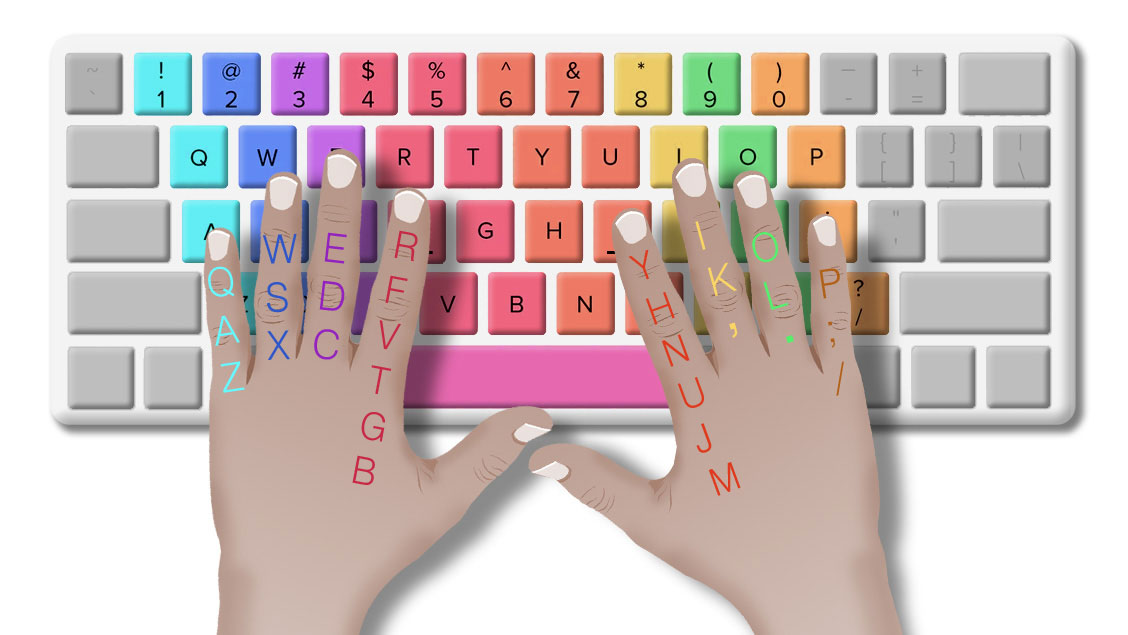
- Left hand: A, S, D, and F.
- Right hand: J, K, L, and the semicolon key.
- Thumbs: Use the space bar comfortably.
The small raised marks on the F and J keys help you locate the home row without looking down.
Keep your fingers relaxed and return them toward the home row after reaching other keys. Avoid stretching your fingers unnecessarily or using only one or two fingers for most typing tasks.
Correct finger placement creates a foundation for both accuracy and speed.
3. Learn Touch Typing Without Looking at the Keyboard
Touch typing means typing primarily by feel rather than looking at the keyboard.
Looking down repeatedly can interrupt your reading and typing rhythm. Learning key positions allows you to keep your attention on the text and notice mistakes sooner.
To practise touch typing:
- Begin with simple letters and short words.
- Keep your eyes on the screen or the text you are copying.
- Use the appropriate fingers for different keys.
- Practise slowly until the movements become more familiar.
- Introduce longer words and paragraphs as your control improves.
Avoid forcing yourself to type quickly while learning. Accuracy is more important than speed during the early stages.
4. Identify and Practise Your Most Common Mistakes
Repeated errors often reveal specific weaknesses in your typing technique. You may confuse neighboring keys, omit letters, use incorrect capitalization, or insert extra spaces.
Instead of repeating the same general exercise every day, review your test results and identify your most frequent errors.
For example, if you repeatedly mistype words containing R, T, E, and W, practise short word groups that use those letters.
Try this method:
- Record the words or letter combinations you commonly mistype.
- Practise each group slowly and correctly.
- Repeat the exercise without rushing.
- Retake a typing test and check whether those errors decrease.
If your typing platform provides an error report, use it to guide your practice. If it does not, note your mistakes manually after each session.
Targeted practice helps you spend more time correcting your actual weaknesses.
5. Practise Common Words and Complete Paragraphs
Individual letters and short words are useful for learning key positions, but real typing tasks require you to handle complete sentences.
Practising common words helps build familiarity with frequently used letter combinations. Paragraph practice adds punctuation, capitalization, spacing, and sentence-level rhythm.
Use a combination of exercises:
- Letter drills: Improve control over specific keys.
- Word drills: Practise common words and difficult combinations.
- Sentence practice: Work on punctuation, capitalization, and spaces.
- Paragraph practice: Develop consistency over longer passages.
When copying a paragraph, look slightly ahead in the text when comfortable, but do not rush beyond your ability to reproduce it accurately.
6. Take Regular Typing Accuracy Tests
Practice tests help you measure progress and identify areas that need improvement.
Start with a free online typing test on TypingTestSkill. Use the same test duration and similar difficulty when comparing results so that your progress is easier to interpret.
Try these practice options:
- 1-minute typing test — a quick accuracy check.
- 3-minute typing test — useful for practising consistency.
- 5-minute typing test — helps you assess performance over a longer passage.
- 10-minute typing test — useful for practising sustained typing.
After each test, record your WPM, accuracy percentage, and error count if available. Remember that different platforms may use different scoring formulas.
Do not judge your progress by a single result. Compare several sessions to see whether your accuracy is improving consistently.

7. Maintain a Comfortable Typing Posture
Your typing environment can affect comfort and consistency, especially during longer sessions.
Follow these basic ergonomic practices:
- Sit with your back supported and shoulders relaxed.
- Keep your keyboard at a comfortable height.
- Position your screen so you can read without leaning forward.
- Keep your wrists relatively straight rather than sharply bent.
- Avoid pressing keys with unnecessary force.
- Take short breaks when your hands or shoulders become tired.
A comfortable setup does not automatically guarantee better accuracy, but reducing discomfort and fatigue can make it easier to maintain good technique.
8. Follow a Daily Typing Practice Routine
Regular, focused practice is generally more useful than occasional long sessions. Start with 15–20 minutes a day and adjust the duration according to your needs.
Here is a simple routine:
Practice activityTimeHome row and finger-control drills3 minutesCommon words and difficult letter combinations4 minutesSentence or paragraph typing5 minutesTimed typing test3–5 minutesReview mistakes and note progress2 minutes
During each session, choose one specific improvement goal. For example, you might focus on reducing omitted letters one day and improving punctuation the next.
If your hands become uncomfortable, take a break rather than continuing through pain.
A Simple 4-Week Plan to Reach 95% Accuracy
Your progress will depend on your starting accuracy, previous experience, and consistency. Use this four-week plan as a framework, not a guarantee that you will reach a particular percentage by a fixed date.
Week 1: Build correct habits
Focus on home row positioning, relaxed fingers, and typing at a controlled speed. Measure your starting accuracy and identify your most frequent mistakes.
Week 2: Practise weak keys and words
Spend more time on the letters and combinations that cause errors. Add short sentences and paragraphs while maintaining correct finger placement.
Week 3: Improve consistency
Take regular three- and five-minute tests. Review each result and adjust your practice according to the errors you make.
Week 4: Test your progress
Complete several timed tests under similar conditions. Compare your average accuracy with your starting results and continue practising any remaining problem areas.
If your accuracy has not reached 95% by the end of four weeks, keep working on your weak points. Consistent improvement matters more than meeting an arbitrary deadline.
Common Mistakes That Reduce Typing Accuracy
Avoid these habits while practising:
- Rushing: Trying to increase WPM before you can control your keystrokes.
- Looking down repeatedly: Breaking your focus to locate keys.
- Using incorrect finger positions: Reaching for keys inconsistently.
- Ignoring test results: Repeating exercises without addressing frequent errors.
- Practising only short tests: Failing to assess accuracy over longer passages.
- Tensing your hands: Using excessive force or maintaining an uncomfortable posture.
- Practising without a goal: Spending time typing without reviewing your performance.
Correcting one or two recurring habits can be more useful than changing everything at once.
Conclusion
Improving typing accuracy above 95% starts with correct technique, controlled speed, and consistent practice. Use proper finger placement, learn touch typing, practise difficult words, and review your errors after each test.
Begin with short exercises and gradually introduce longer paragraphs and timed tests. Track both your accuracy and WPM so that you can identify genuine improvement instead of focusing on speed alone.
Start practising today: Take a free typing test on TypingTestSkill, record your starting accuracy, and use the results to plan your next practice session.
Frequently Asked Questions
1. What is a good typing accuracy percentage?
Aiming for 95% or higher is a useful practice goal for many learners. The required accuracy for a particular job or examination depends on the employer's or test provider's rules.
2. Why is my typing accuracy low?
Common reasons include rushing, incorrect finger placement, unfamiliarity with key positions, poor typing rhythm, and insufficient practice. Reviewing your repeated errors can help you identify the main cause.
3. Can I improve typing accuracy without slowing down?
Yes, but if you are making frequent mistakes, temporarily reducing your speed can help you develop better control. Increase your pace gradually as your accuracy becomes more consistent.
4. How long does it take to reach 95% typing accuracy?
There is no fixed timeline. Your progress depends on your starting accuracy, typing experience, practice quality, and consistency. Measure your results regularly rather than relying on a guaranteed number of days or weeks.
5. Does touch typing improve accuracy?
Touch typing can help you develop consistent finger movements and reduce the need to look at the keyboard. However, accuracy still depends on proper technique and regular practice.
6. How can I test my typing accuracy online?
Use an online typing test that reports accuracy along with WPM. Repeat tests under similar conditions and compare several results to understand your progress.
7. Should I focus on typing speed or accuracy first?
If you are making frequent errors, focus on accuracy first. Once you can type consistently and correctly, work on increasing your speed without allowing your error rate to rise significantly.